 Kiryl Kavalenka Hey, I'm a Product Designer focused on the area of product growth, delving into analytics, user research, and coding. Table of contents
 - What is A/B testing?
- Benefits of A/B testing
- A/B testing steps
- Defining goals and metrics
- Defining a hypothesis
- Creating the new variant (or variants)
- Experimentation
- Analysis and implementation
- Defining goals and metrics
- A/B testing example
- Step 1: Defining goals and metrics
- Step 2: Defining the hypothesis
- Step 3: Creating the new variant (or variants)
- Step 4: Experimentation
- Step 5: Analysis and implementation
- Step 1: Defining goals and metrics
- When should designers use A/B tests?
- When should designers avoid A/B tests?
- A/B testing vs. Usability testing
- Common A/B testing mistakes
- FAQs
- Conclusion
 Introducing Galileo AI LogRocket’s Galileo AI watches every session, surfacing impactful user struggle and key behavior patterns. LEARN MORE
 There are endless ways to design digital product interfaces— you can use different colors, typography properties, layouts, and text. We should choose the most user-friendly, efficient, and high-quality design variant that also supports business goals. If you end up with the two best design versions for a specific part of the digital product interface during your UX process, how would you fairly decide which one to use?
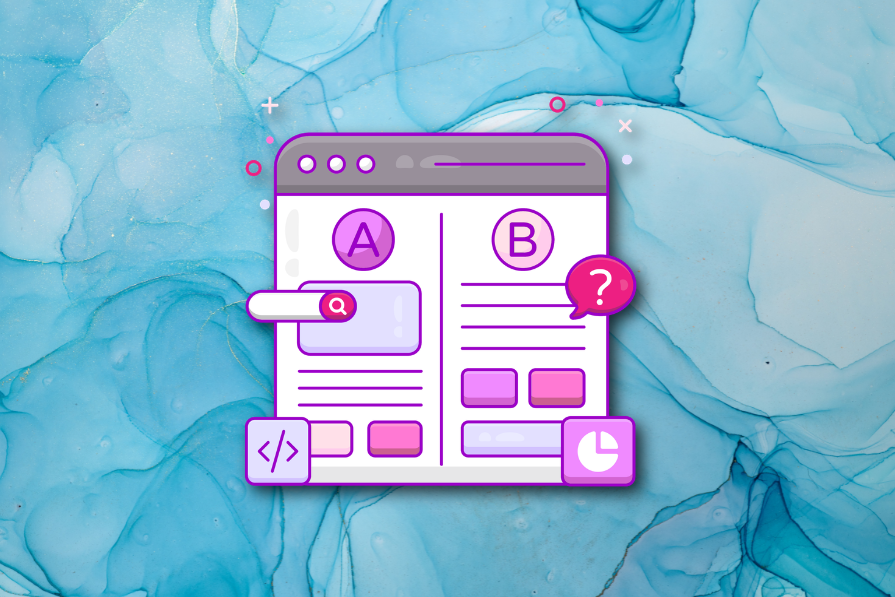
A/B testing, the most popular quantitative UX decision-making technique, helps you to seamlessly get the userbase’s help to find the most suitable design version if you struggle choosing which design variant is better.
Let’s understand what’s A/B testing, when you should (or shouldn’t) do it, and how to conduct one for your design scenarios properly, avoiding common A/B testing mistakes.
Editor’s note: This post was updated in May 2026 by LogRocket author Shalitha Suranga to provide a more comprehensive guide to A/B testing in UX design, including when to use A/B tests, when to avoid them, common mistakes, UX experiment metrics, and how A/B testing compares with usability testing.
What is A/B testing?
In UI/UX design, A/B testing, also known as split testing, refers to a quantitative UX research method that compares two design versions based on real user behavior to identify the top-performing design version. It’s named with “A/B” since two versions, A and B, are evaluated:
- Version A: Control, the original design version that usually already exists
- Version B: Variant, the new design variant that competes with version A
A/B testing selects the winning version using metrics like click-through rate (CTR), conversion rate, bounce rate, and average session duration:
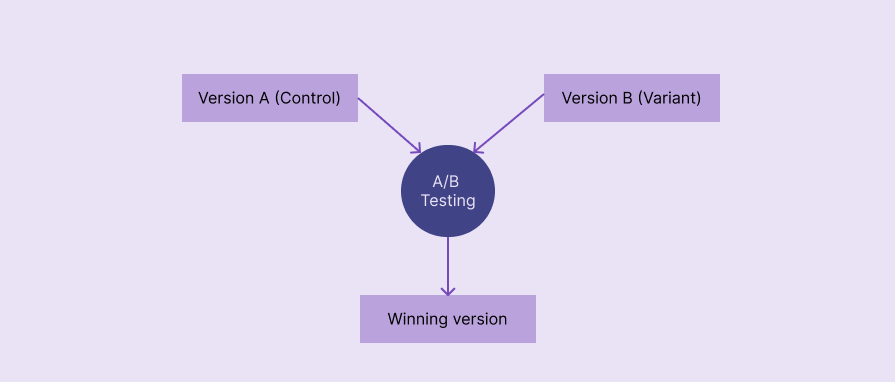 Comparing version A against version B in standard A/B testing
 Benefits of A/B testing
A/B testing is a powerful, user-centric decision-making technique with proven benefits to incrementally extend existing user interfaces:
- Fair, effective, data-driven decision making: No need to spend time arguing which design is the best in internal design discussions — A/B testing uses real user behavioral data to decide which design variant is best
- Increased conversion rate: The design variant that the users love most always wins. So, when you are evaluating CTAs or similar elements, the winning design always gets the highest conversion rate compared to the other design versions
- Frictionless, fast user testing: A traditional usability test requires providing slow qualitative feedback, but A/B testing helps evaluate designs faster by seamlessly evaluating user behavior with various quantitative decision metrics
- Low-risk, low-cost evaluation: A/B testing can be magically automated to produce low-risk and low-cost evaluations — no need to worry about surprising negative user reactions or overrunning the design budget
- Better understanding of users: A/B testing is a simple quantitative decision-making technique, but the evaluation happens on a live product by targeting real users, so using proper metrics helps you extract important design details that you could use even later, e.g., what colors or labels perform best for the targeted user base
A/B testing is a low-risk, low-cost, fast, and effective decision-making method that uses real users’ behavioral data
A/B testing steps
A/B testing goes through five key phases: defining goals and metrics, defining a hypothesis, creating design variants, experimentation, and analysis:
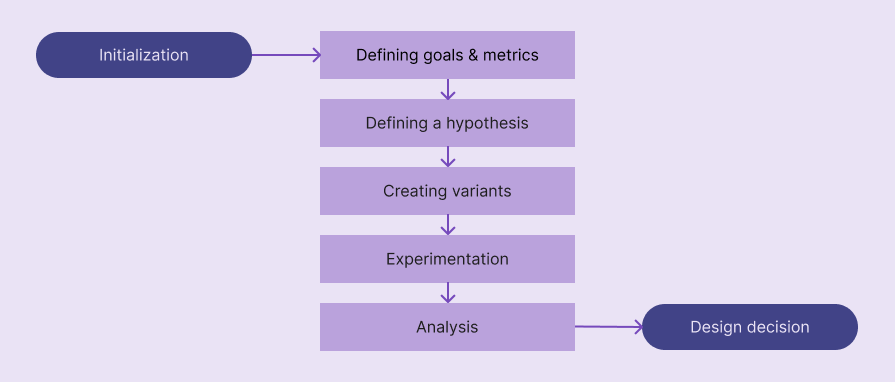 Primary steps in the A/B testing process
 Let’s understand what exactly happens inside each step:
Defining goals and metrics
You should know the goals of your A/B testing case before beginning it. Basically, answer the “Why should I do an A/B test?” question to get a clear understanding of goals. e.g., “I am doing an A/B test to understand which CTA label performs better.”
To form a strong hypothesis for your A/B test, you need to select a good metric that calculates the final scores for each variant. Metric changes can affect each other, so selecting several guardrail metrics along with the primary one helps you confidently decide which design variant is the best in all aspects.
Here are some common metrics used in most A/B tests:
- Conversion rate: Percentage of users who took the desired action, e.g., signing up, downloading a software product, etc.
- Click-through rate (CTR): Percentage of users who clicked on a specific element
- Task success rate (TSR): Percentage of users who completed a specific task
- Bounce rate: Percentage of users who left the product or specific UI segment without continuing interaction. High bounce rate is a sign of poor UX
- Session duration: How long a user spends with the product or a specific feature in a single user session; the length of a single user session
- Time on task: How long a user takes to complete a specific task. Shorter times usually show better UX properties and productivity
You aren’t limited to these metrics; you can use other metrics like scroll depth, retention rate, etc., or create your own metric based on your A/B testing goals

Over 200k developers and product managers use LogRocket to create better digital experiences
 Learn more →
 Defining a hypothesis
A/B testing hypothesis refers to a concise assumption that states why changing a specific design element increases/decreases a specific metric. Like in other quantitative analysis scenarios, A/B testing uses an alternative hypothesis with a null hypothesis to statistically conclude whether version A or B is better.
A good A/B testing hypothesis should contain the following details:
- Changes for a design element: Changes you make to only one design element to produce version B, usually by changing label, color, border, typography property, imagery, layout, general behavior, etc. Choose only one design element; otherwise, you’ll have to perform multivariate testing instead of A/B testing
- Metric changes: Will the metric increase or decrease after changing the design element
- Rationale: Reason why you assume the metric changes after adjusting the particular design element
You can use the following generic template to define your alternate hypothesis:
If we [changes for a design element], then [metric changes], because [rationale]
Here are some examples:
- If we use the primary CTA label as “Download for <OS name>”, the conversion rate will increase because the action feels instant and personalized
- If we use an infinite loading for the music list, the session duration will increase, since it’s more seamless than the existing pagination
Create a solid hypothesis using the above format and carefully analyze your existing design and new idea.
Creating the new variant (or variants)
A/B testing is usually done for the original, existing design against a new proposed design variant, so you usually have to newly design only one variant at this stage. If you do A/B testing for two new ideas, you should create two design variants.
Create a new design variant based on your hypothesis and prepare it for A/B testing experimentation, which is handled by developers. This isn’t a special design — use Figma or your team’s preferred design tool to create the high-fidelity prototype for the particulate UI region.
Experimentation
At this stage, you are collaborating with developers to run the A/B testing. You should send the following things in an A/B testing experimentation plan to developers to help them conduct an accurate A/B test:
- Hypothesis to understand the task context
- High-fidelity designs for variant B (both A and B if you are testing two new ideas)
- Experimentation duration, e.g., 2 weeks
- Traffic distribution rules, e.g., targeting only mobile devices, a specific OS, new users, etc.
- All metrics you are interested in, including a primary metric, secondary metrics, and guardrail metrics
Once A/B testing has been started, 50% of users will receive version A, and the other 50% will get version B through A/B testing tools (e.g., Optimizely) or other feature deployment strategies (via load balancers, feature flags, etc.) that the development team uses.
At the end of the experimentation, the development team will provide values for all requested metrics.
Analysis and implementation
Evaluate your hypothesis based on A/B testing results — it can be accepted or rejected. Even though you can simply identify which design variant is better just by comparing the values of the metric, you should write a statistical analysis by stating statistical confidence, especially because you conduct traditional, statistical, quantitative research under UI/UX A/B testing.
When you write the A/B testing conclusion, you should mention whether your alternative hypothesis is accepted (null hypothesis is rejected) or rejected (null hypothesis is accepted) using a statistical result interpretation method like p-value or Bayesian method.
If the hypothesis is accepted, version B is better than the original version A, and you can continue the version B deployment process, collaborating with developers. Otherwise, you can keep the original version A and document the summary for future A/B testing scenarios and general design considerations.
A/B testing example
Let’s simulate an A/B test for a sample scenario by following the above steps to understand the process further.
Assume that you need to do an A/B test to prove that changing the primary CTA label to “Try it for free” from “Get started” will improve the conversion rate.
Step 1: Defining goals and metrics
The goal is to prove that changing the primary CTA label to “Try it for free” will increase conversion rate. The primary metric is conversion rate. Guardrail metrics can be ones that validate revenue impact, like revenue per visitor (RPV), freemium conversion rate, etc.
Step 2: Defining the hypothesis
- Alternate hypothesis: If we use the primary CTA label as “Try it for free”, the conversion rate will increase because the new label implies that the user can get started with the product without adding payment card details
- Null hypothesis: Changing the primary CTA label has no impact on conversion rate
Step 3: Creating the new variant (or variants)
Creating a new landing page design variant by changing the CTA label
Step 4: Experimentation
Running the test for 2 weeks for new users
Step 5: Analysis and implementation
Assume that this sample A/B test produced the following result table:
| Metric | Version A | Version B |
| No. of visitors | 10000 | 10000 |
| Conversions | 500 | 600 |
| Conversion rate | 5% | 6% |
According to the result, version B performed better than version A, increasing the conversion rate by 20%. Let’s write a statistical conclusion for these results by using the popular p-value comparison method.
Use an A/B testing tool or an A/B testing p-value calculator to calculate the p-value. I used AB Testguide online calculator:
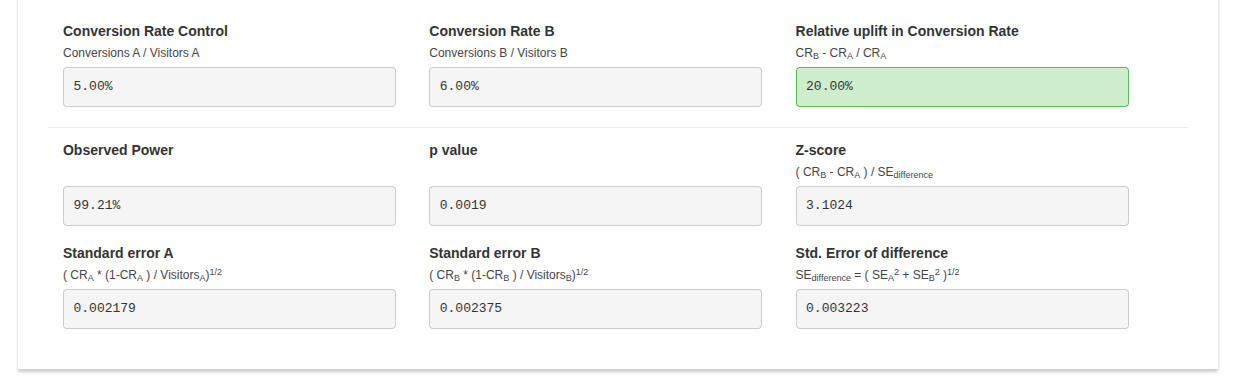 Calculating the p-value for the sample A/B test results using AB Testguide’s calculator
 The calculated p-value: 0.0019. The calculated p-value is less than the common significance threshold, 0.05, so the 20% conversion rate increment of version B is statistically significant and isn’t likely due to chance.
Hypothesis accepted, using “Try it for free” as the primary CTA label increases the conversion rate by 20%. So, version B can be deployed.
When should designers use A/B tests?
Designers can effectively improve UX by using A/B testing for the following cases:
- Expects a boolean decision: A/B testing outputs the acceptance or rejection of a hypothesis, so it will be the optimal method if you expect a yes/no answer for a design decision at the end, e.g., the new background imagery improves (or doesn’t) user engagement
- Quantitative scoring is possible: If quantitative metrics can be used for data collection, A/B testing becomes the most practical UX evaluation method
- High traffic UI regions: When the sample size increases, the final result becomes more statistically significant, so A/B testing delivers more confident summaries for high-traffic products
- A clear hypothesis can be formed: If the design evaluation can form a clear, testable hypothesis, the math and final reasoning in A/B testing will be more accurate
- Avoiding internal design debates: People think differently, so while one person argues that version B is better, another will still support version A. A/B testing is a fair, user-centric way to decide a winning version
When should designers avoid A/B tests?
Conducting A/B tests for the following cases won’t deliver statistically confident and overall effective results:
- Expects qualitative feedback: A/B tests output boolean statements, so they won’t work in scenarios where you expect descriptive output, e.g., evaluating the pros and cons of a new feature
- Low traffic UI regions: Statistical significance decreases with the sample size decrement, so we can’t form a design decision confidently using A/B tests on low traffic elements
- Large UI/UX improvements: A/B testing results can’t effectively describe user behavior in detail for complex UI/UX improvements, since it focuses on selecting one from two versions of a single design element. However, you can do an A/B test for a large UI/UX change if you already did a usability test for the whole change, e.g., evaluating the new checkout flow of a hotel booking app
- Early-stage designs: A/B testing is done on the real user base, so testing incomplete features can negatively affect the overall usability and product reputation
- Straightforward design decisions: You shouldn’t overuse A/B testing; if version B can be selected based on general UI/UX design principles, you should use version B after internal agreements, e.g., using a more accessible CTA button variant if the current one’s color blends with the hero section background
A/B testing vs. Usability testing
A/B and usability testing can both be used to evaluate designs; however, they are two different testing strategies that produce two different result types:
| Comparison factor | A/B testing | Usability testing |
| Description | A quantitative UX research method that helps designers decide the best version by evaluating two design versions on the live product | A qualitative UX research method that helps designers get insights about design ideas or improvements from a small number of participants |
| Research method type | Quantitative | Qualitative |
| Goal | Deciding which design version is better | Identifying user pain points |
| When it’s done | After shipping the product | In any stage of the product design process |
| Type of participants | Actual users | Actual or potential users and other product stakeholders |
| Number of participants | Many, usually thousands | Less, usually 5-10 |
| Experiment environment | Live product | Prototype, staging environment, or a special session of the live product |
| Results | A boolean result, yes/no, which describes whether or not the proposed design variant is better than the original version | Insights about pain points and efficiency that help improve usability factors |
A/B testing identifies whether or not a new design element variant is better than the existing one using numbers (quantitative data), and usability testing produces insights about user behavior within a digital product.
Common A/B testing mistakes
Even if you initiate an A/B test for the right scenario, it can still produce incorrect results if you don’t carefully avoid the following common A/B testing mistakes:
- Running the test during special periods: Traffic during holidays, seasonal periods, and other special periods can generate results that don’t properly represent normal user behavior
- Stopping the test early: Early test stops can decrease expected traffic, reduce the statistical significance of results, and result in a false positive interpretation
- Overlapping A/B tests: If you run more than one A/B test at the same time and they overlap, you won’t get accurate results for any A/B test since one design element variant can affect another, and vice versa
- Incorrect experiment configuration: Poor experiment design, misinterpretation of the A/B test experimentation plan, or developers’ mistakes can make the real A/B test so different than the planned one
- Evaluating only one metric: Not selecting guardrail metrics along with the primary metric can lead to wrong decision-making that negatively affects overall product usability
FAQs
Here are some common questions that you may ask yourself when you are getting started with the UI/UX A/B testing process:
Can I test more than two design versions with A/B testing?
Yes, you can test any number of design variants, but it’s called A/B/n testing — not the standard A/B testing
How big should an A/B testing sample size be?
Large enough to get a statistically significant result. You don’t need to worry about this if your product receives a very large amount of traffic; otherwise, verify the sample size requirement using an A/B testing sample size calculator like Optimizely’s
How long should you run the experiment?
Until you reach the sample size requirement or statistical significance. In a product that receives good incoming traffic, running A/B tests for at least 1–2 weeks is recommended
Will version B design variant affect the real usability score and conversion rates?
Yes, but a good version B can drastically reduce negative effects
Parallel vs. Sequential: Which traffic distribution is better?
Running a single A/B test in parallel by splitting the traffic is better since sequential traffic can lead to time-based bias
Should we always use the fixed 50%/50% traffic splitting logic?
No, you can use dynamic A/B testing traffic allocation to increase traffic for the winning version to optimize the traffic. It’s called a multi-armed bandit test
Conclusion
In this article, we discussed how to get started with A/B testing for evaluating two design versions during the product development process. A/B testing is a widely used design evaluation technique that tech giants use to improve usability and product revenue. A/B testing is a simple technique that any digital product can benefit from, but it should be initiated properly with an efficient, automated flow to effectively select the most suitable design variant while maintaining seamless user involvement.
If you are going to run your first A/B test on your digital product, build an efficient, automated A/B testing workflow by collaborating with developers first, using a dedicated A/B testing tool like Optimizely, VWO, etc., or building an organization-specific flow using developers’ deployment tools like Kubernetes. Then, identify whether an A/B test is really needed for your decision-making scenario, start with a clear goal, define a strong hypothesis, run the experiment properly, and conclude with proper statistical analysis.
LogRocket helps you understand how users experience your product without needing to watch hundreds of session replays or talk to dozens of customers.
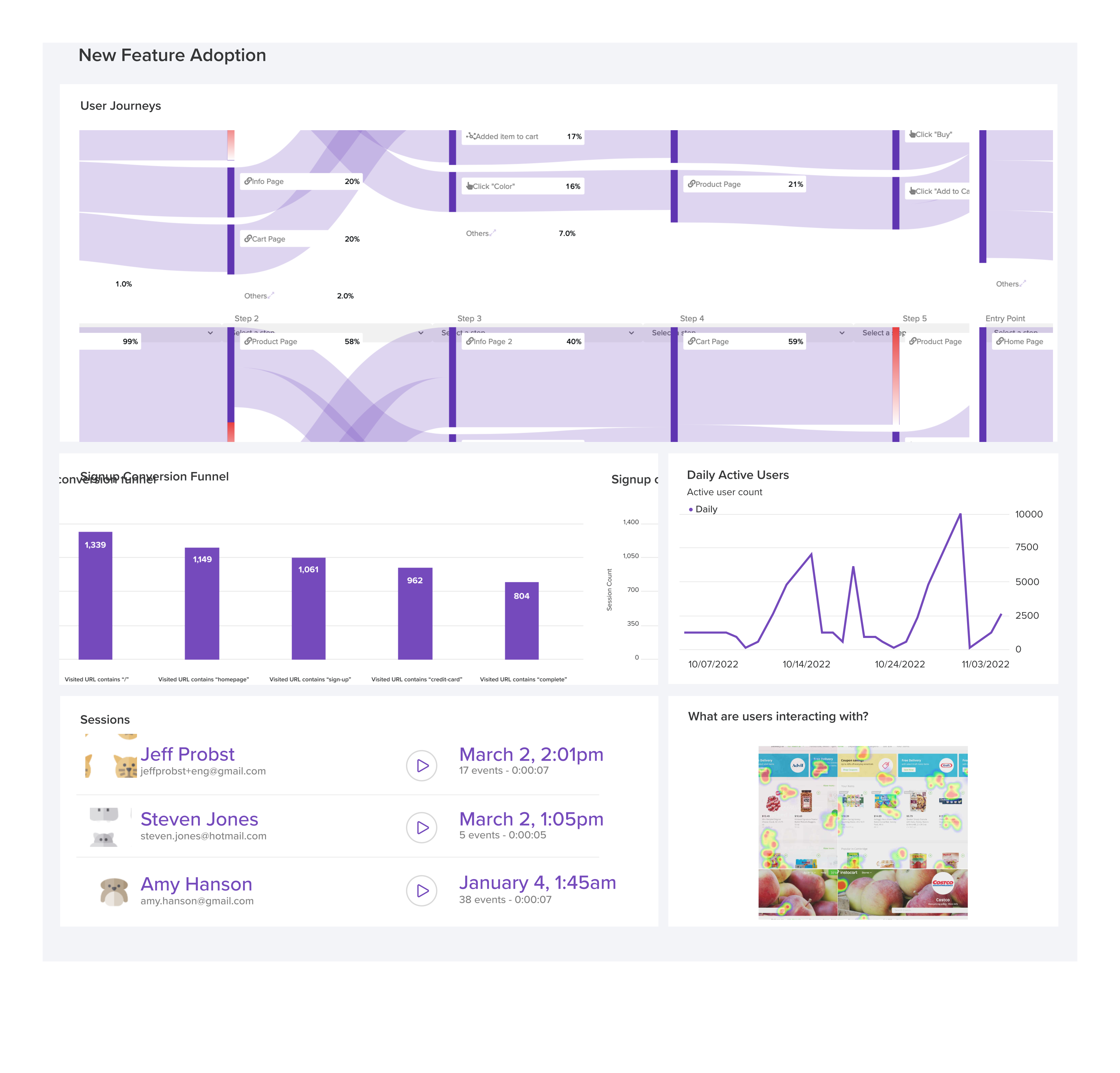
LogRocket's Galileo AI watches sessions and understands user feedback for you, automating the most time-intensive parts of your job and giving you more time to focus on great design.
See how design choices, interactions, and issues affect your users — get a demo of LogRocket today.
- #ux research



Stop guessing about your digital experience with LogRocket
Get started for freeRecent posts:

Design engineering then vs. now: How AI is reshaping the designer-developer divide
Design engineering has always lived between design and code. But with AI tools turning prompts into interfaces and code into editable canvases, that bridge is becoming a new way of building.
 Oscar Jite-Orimiono May 14, 2026 ⋅ 9 min read
The project that made me question the UX process
A three-week mobile banking project taught me that the “proper” UX process is not always realistic. Sometimes, the better approach is to work with what you know, identify what you still need to learn, and make the strongest decision possible under real constraints.
 Neil Nkoyock May 7, 2026 ⋅ 8 min read
Friction is a design tool, not a UX problem
This case study shows how one ad experience redesign increased total ad exposure while lowering perceived friction, proving that timing and context can matter more than raw interruption.
 Bart Krawczyk May 1, 2026 ⋅ 4 min read
Cross-product navigation is broken — here’s how to fix it
As products evolve into ecosystems, navigation becomes a system-level challenge. This article explores how to align structure, context, and user journeys to create seamless movement across tools without confusion.













Comments
0 comment